Skills

Get Started

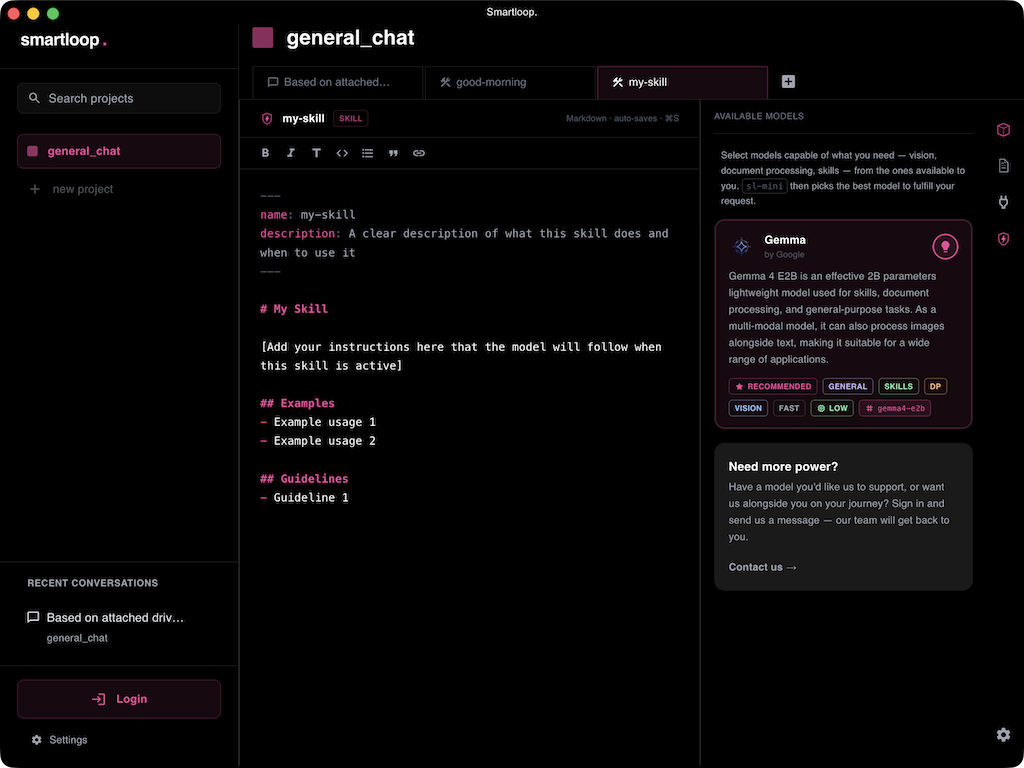
Agent skills are a way to elevate your workflow and get more out of the tool. You can create skills as simple as retrieving stock information, as shown below:

---
name: get-stock-info
description: Get stock information for a given ticker symbol from Yahoo Finance.
---

This skill retrieves the following information about a stock:

* Stock Price & Trading Info
* Company Information
* Financial Metrics
* Earnings & Revenue

Execute the following tool to get the stock information for a symbol:

````mcp
yahoo-finance-mcp.get_stock_info(ticker=<string>, period='1mo', interval='1d')

Skills Template

We follow the standard skill template with additional capabilities to help with tool calls, as shown above. This particular skill requires the yahoo-mcp-server to be configured when a user asks for stock information for AAPL.

Skills can also follow a given-when-then format. In the UI, you can type a prompt like this:

alt text

This will auto-generate a formatted skill with an mcp block and starter content that you can extend to fit your style.

---
name: list-issues
description: When the user asks to list issues, this skill retrieves a list of top 5 tasks from the Linear workspace.
---

Call Linear MCP.list_issues(limit=5)

```mcp
linear.list_issues(limit=5)
```

Wrap

Here is an example of a more complex skill that compares invoices based on my personal documents and a configured MCP server, and then creates a discrepancy report.

---
name: invoice-discrepancy-report
description: When the user asks to compare invoices and identify billing discrepancies, this skill gathers invoice, order, and receipt data, performs a comparison, reports findings, and creates a Linear ticket for follow-up.
---

**Skill Instructions:**

**Data Extraction**: Extract relevant information from the following documents:
* Purchase Order(s)
* Goods Receipt Notes (if available)
* Supplier Invoice(s)
Ensure to include URLs or IDs for all referenced items.

**Data Comparison**: Compare the extracted data across all three sources: supplier invoice, goods receipt notes and purchase order.

**Buyer Details Inclusion:** Include buyer details in the report.

**Discrepancy Identification**: Identify any discrepancies between invoices regarding pricing, quantities or other relevant fields.

**Report Generation**: If discrepancies are found:
* Generate a structured report summarizing each discrepancy with supporting evidence (invoice URLs/IDs).

**Issue Creation:** Execute the following command to create an issue:

```mcp
linear.save_issue(title='Billing Discrepancy - Supplier', description='Discrepancies found in invoices comparing goods and purchase receipts.', team=Billing, assignee=me)
```

**Comprehensive Coverage**: Ensure all three invoices (supplier, goods, purchase) are included within the report.

Next steps

It is also possible to manage skills using your terminal, once you have studio desktop installed ,you can do the following follow to add a skill:

EDITOR=nano slp skill add $EDITOR

Here I have set nano as my editor , that will open a skill editor in the terminal for writing and saving the skill.

Or inline:

slp skill add "when user requests current stock price, use yahoo mcp to get the stock info and return current price for the given symbol"

Summary

Agent skills are the blueprint of your project and define how you want to perform tasks, extract information, or create a foundational AI app that you can extend with APIs to automate your workflows.