Local AI
Smartloop runs its models on your own hardware. Inference happens on the device, not on a hosted service, and your documents never leave it — the only traffic out is what you ask for, such as a web search or a call to a connection. On top of that, it serves an OpenAI-compatible API, so you can build on local infrastructure with the same clients and SDKs you would use against a cloud provider.
This page covers what runs on your machine, how to check on it, and how to query it.
What runs on your machine
When Studio is open, a local agent runs alongside it:
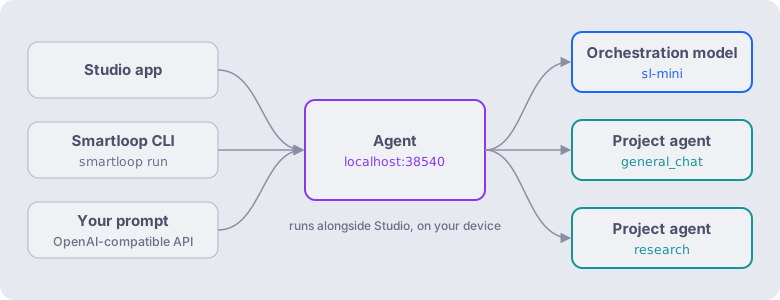
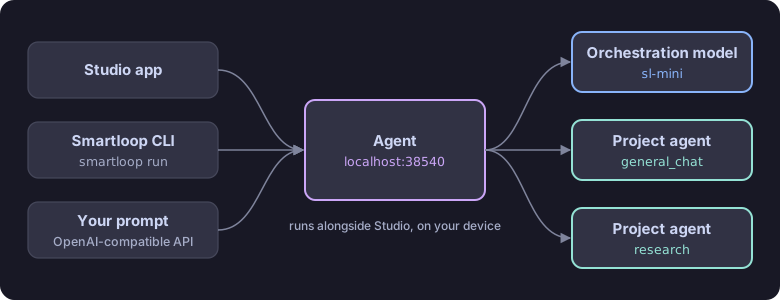
- The agent serves the API on
localhost:38540. Studio, the Docent, and your prompts sent through the API all go to it. - The orchestration model,
sl-mini, is loaded when the agent starts. It plans each request and picks the model best suited to each step — see Model Orchestration. - Each project gets its own agent process, with its own port and memory, so projects stay isolated from one another.
Models are quantized (generally Q4_K_M) so they run on everyday laptops and desktops with little loss in quality.
Hardware
| Requirement | Description |
|---|---|
| OS | macOS (Apple Silicon), Linux (x86_64), or Windows (x86_64) |
| GPU | Metal on macOS; a Vulkan-capable GPU (NVIDIA, AMD, or Intel) on Linux and Windows. Optional — falls back to CPU. |
Which models can run depends on available memory: unified memory on Apple Silicon, VRAM on a dedicated GPU, or the shared memory of an integrated GPU. The orchestrator takes this into account when it chooses a model.
Checking the agent
Run the CLI:
docent agent status
Endpoint: http://localhost:38540
Status:   healthy
Model:    sl-mini (Q4_K_M, 32768 ctx, 769 MB)
Process:  pid 8738, 249 MB
+--------------+------+-------+-------+------+--------+
| Project      | PID  | Port  | Alive | Idle | Memory |
+--------------+------+-------+-------+------+--------+
| general_chat | 2668 | 62110 | true  | 766s | 122 MB |
+--------------+------+-------+-------+------+--------+
| Line | Meaning |
|---|---|
| Endpoint | The base URL for every API request on this page. |
| Status | Whether the agent is up and answering. |
| Model | The orchestration model, its quantization, context window, and size on disk. |
| Process | The agent's process ID and memory use. |
| Project table | One row per project agent: its process, port, whether it is alive, how long it has been idle, and its memory use. |
If the status isn't healthy, open the Studio app — the agent runs alongside it.
Health check
For scripts and monitoring, the same information is available from the API without the CLI:
curl http://localhost:38540/health
{
  "status": "healthy",
  "model_loaded": true,
  "model_name": "sl-mini",
  "n_ctx": 32768,
  "model_size_bytes": 806058336,
  "quantization": "Q4_K_M",
  "flash_attn": false,
  "memory_percent": 0
}
Available models
The set of models changes as new ones are added, so rather than keeping a fixed list here, ask the agent which ones the orchestrator can choose from on this machine:
curl http://localhost:38540/v1/models
Each entry gives the model's name, a description, and its capabilities, such as general, reasoning, or vision.
Building on the API
The API follows the OpenAI Chat Completions specification, so any client or SDK that supports OpenAI works out of the box. Use it to automate project creation and document upload, extract information from a project, and build integrations on top of it.
API reference
The agent documents its own API. With the agent running, open http://localhost:38540/docs in your browser for the full reference: every endpoint, grouped by area (chat, projects, documents, skills, MCP, models, and more), with its parameters, request and response schemas, and ready-to-copy examples in curl, Python, Node.js, and other languages.
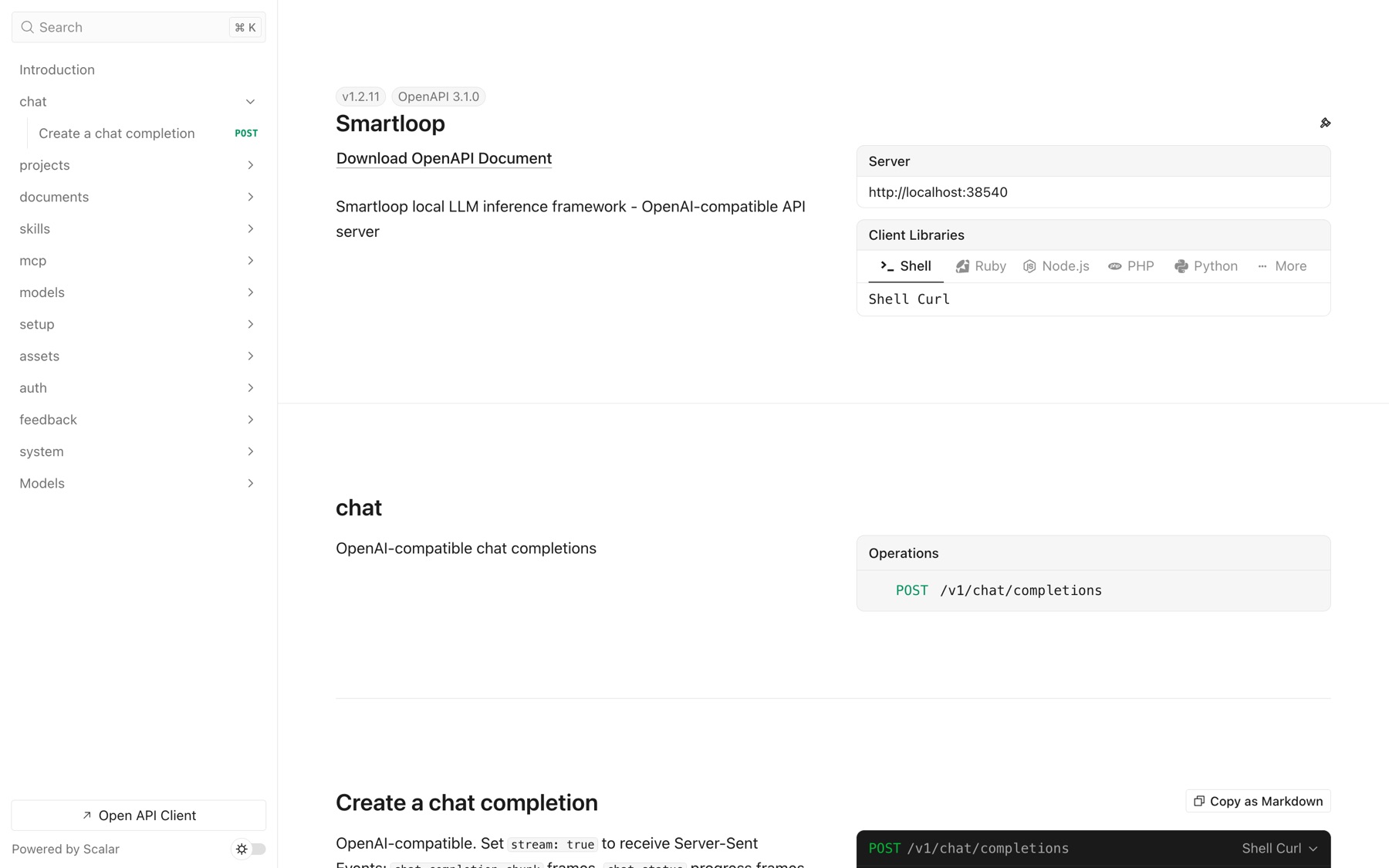
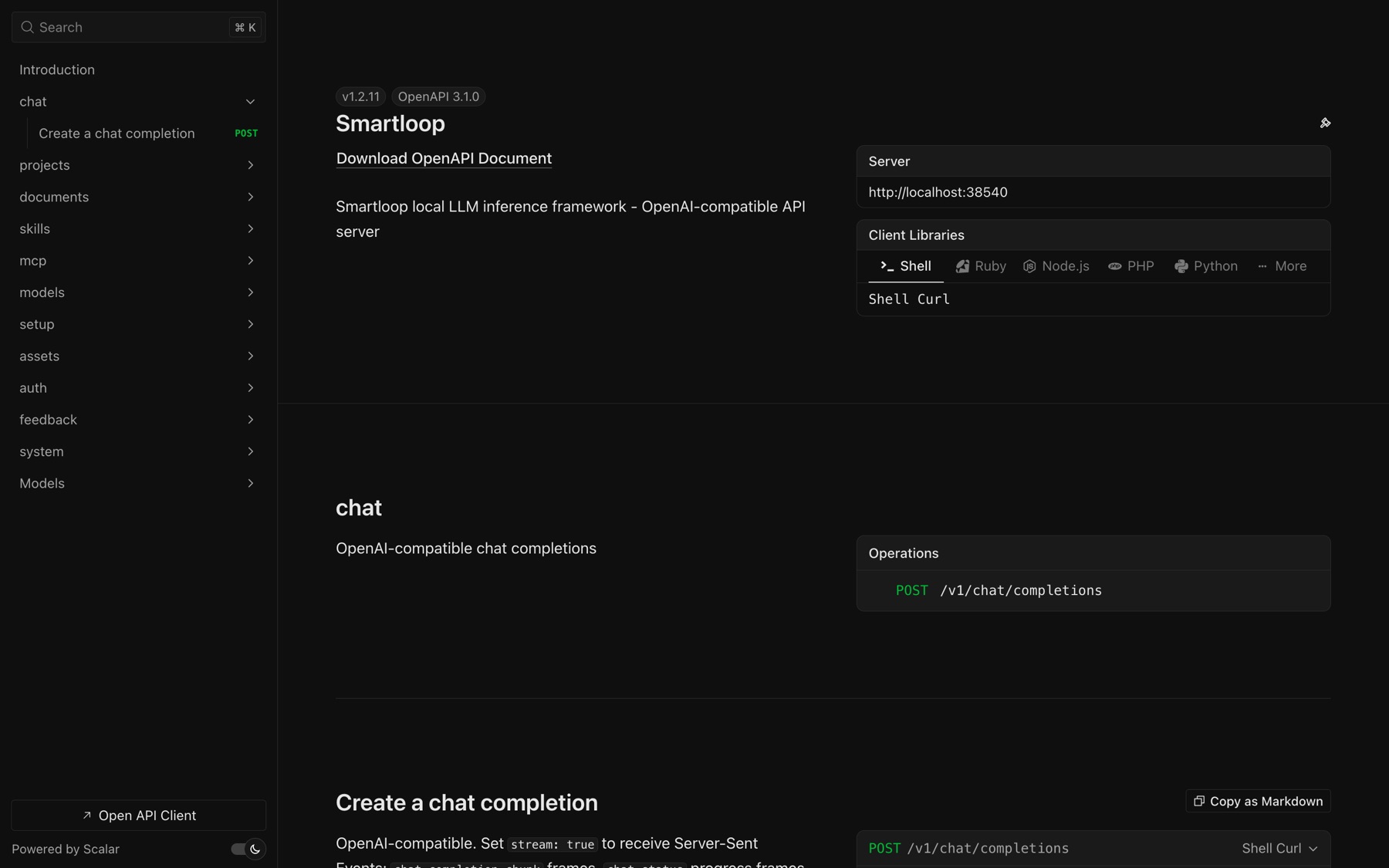
The page is served by the agent itself, so it works offline and always matches the version you have installed.
Retrieve Project ID
Before querying against a project, you need its project_id. The quickest way is the CLI, which lists each project's ID and name:
docent project list
Or ask the API directly:
curl http://127.0.0.1:38540/v1/projects
The API returns a list of projects, for example:
{
  "projects": [
    {
      "id": "c91626ed-cded-4bb4-9627-5cb9c257a13e",
      "name": "vanguard",
      "model_name": "sl-mini",
      "current": true
    }
  ]
}
Use the id field as the project_id in your chat completion requests.
Using Python SDK
Install the OpenAI Python SDK:
pip install openai
Query a project by passing project_id as an extra body parameter:
from openai import OpenAI

client = OpenAI(
    base_url="http://127.0.0.1:38540/v1",
    api_key="not-needed",
)

response = client.chat.completions.create(
    model="sl-mini",
    messages=[
        {"role": "user", "content": "What are the fund names and their tickers?"}
    ],
    stream=False,
    extra_body={"project_id": "c91626ed-cded-4bb4-9627-5cb9c257a13e"},
)

print(response.choices[0].message.content)
Using JavaScript SDK
Install the OpenAI Node.js SDK:
npm install openai
import OpenAI from "openai";

const client = new OpenAI({
  baseURL: "http://127.0.0.1:38540/v1",
  apiKey: "not-needed",
});

const response = await client.chat.completions.create({
  model: "sl-mini",
  messages: [
    { role: "user", content: "What are the fund names and their tickers?" },
  ],
  stream: false,
  // @ts-ignore — extended field
  project_id: "c91626ed-cded-4bb4-9627-5cb9c257a13e",
});

console.log(response.choices[0].message.content);
Using CURL
curl http://127.0.0.1:38540/v1/chat/completions \
  -H "Content-Type: application/json" \
  -d '{
    "model": "sl-mini",
    "project_id": "c91626ed-cded-4bb4-9627-5cb9c257a13e",
    "stream": false,
    "messages": [
      {"role": "user", "content": "What are the fund names and their tickers?"}
    ]
  }'
Message Roles
| Role | Description |
|---|---|
system | Sets the behavior and context for the assistant |
user | The end user's message |
assistant | Previous assistant responses (for multi-turn conversations) |
Response Format
{
  "message_id": "msg-71d45ab2",
  "choices": [
    {
      "message": {
        "role": "assistant",
        "content": "Vanguard Ohio Long-Term Tax-Exempt Fund (VOHIX), Vanguard International Value Fund (VTRIX), Vanguard Virtual Value Fund (VTXR)"
      }
    }
  ],
  "citations": [
    { "document_id": "5c41051fd68e9d76b74e0eca3b0ae73e", "document_name": "sp97.pdf" },
    { "document_id": "51886ebb65216aae83fad416f8001459", "document_name": "sp934.pdf" },
    { "document_id": "a613f5035cd7b349e9229fbd4723c9e2", "document_name": "sp46.pdf" }
  ]
}
The response extends the standard OpenAI format with two additional fields:
message_id— unique identifier for the assistant message, useful for feedback and tracking.citations— list of source documents from the project that were used to generate the answer.
Access the response content and citations:
print(response.choices[0].message.content)

# Access citations (returned in the raw response)
import json
raw = json.loads(response.model_dump_json())
for cite in raw.get("citations", []):
    print(cite["document_name"])
Multi-turn Conversations
To maintain context across messages, pass the full conversation history in the messages array along with the project_id:
response = client.chat.completions.create(
    model="sl-mini",
    messages=[
        {"role": "user", "content": "What are the fund names and their tickers?"},
        {"role": "assistant", "content": "Vanguard Ohio Long-Term Tax-Exempt Fund (VOHIX), Vanguard International Value Fund (VTRIX), Vanguard Virtual Value Fund (VTXR)"},
        {"role": "user", "content": "Which one has the highest expense ratio?"},
    ],
    stream=False,
    extra_body={"project_id": "c91626ed-cded-4bb4-9627-5cb9c257a13e"},
)

print(response.choices[0].message.content)
# Vanguard International Value Fund (VTRIX) has the highest expense ratio at 0.35%.
The response follows the same format, with citations referencing the source documents used to answer the follow-up:
{
  "message_id": "msg-3ec5c892",
  "choices": [
    {
      "message": {
        "role": "assistant",
        "content": "Vanguard International Value Fund (VTRIX) has the highest expense ratio at 0.35%."
      }
    }
  ],
  "citations": [
    { "document_id": "a613f5035cd7b349e9229fbd4723c9e2", "document_name": "sp46.pdf" },
    { "document_id": "1c1d5deeb7ea216fec1eed84e1268e30", "document_name": "sp923.pdf" },
    { "document_id": "5c41051fd68e9d76b74e0eca3b0ae73e", "document_name": "sp97.pdf" }
  ]
}